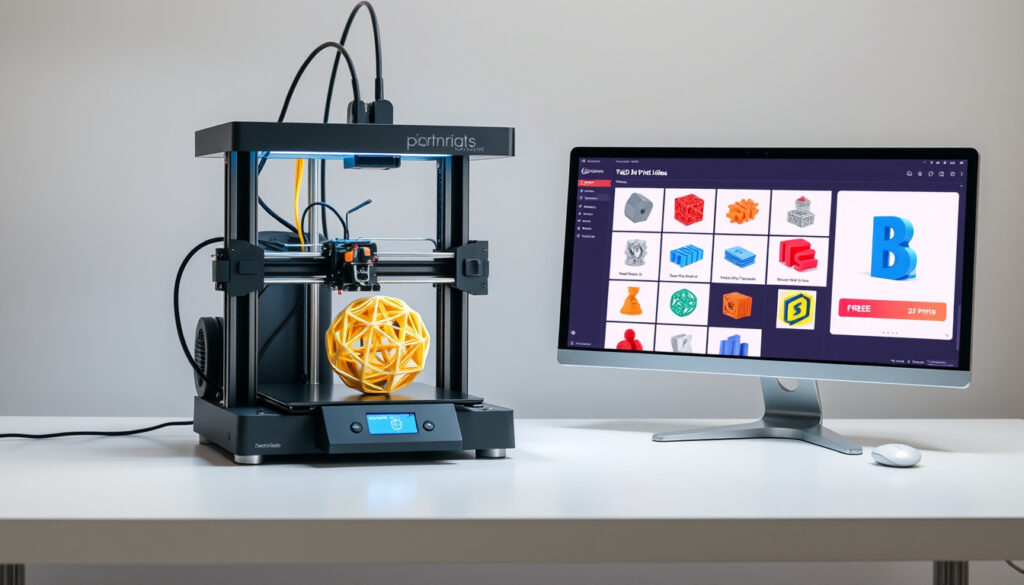
3D Print Files – Beste Plattformer for Gratis Nedlasting
3D printing has transformed how we create prototypes, replacement parts, and creative projects. The key to success lies in finding reliable sources for 3D print files that are easy to download and compatible with various printers. This guide covers the best platforms for free downloads, file formats you should know about, and how to get started as a beginner.
Whether you’re interested in downloading STL files for your first project or looking for a wide range of 3D models for printing, several popular websites offer thousands of free downloadable files. Major platforms like Thingiverse, Printables, and MyMiniFactory have become go-to resources for hobbyists and professionals. Additionally, dedicated search engines like Yeggi index millions of models across various databases.
Where Can I Download Free 3D Print Files?
For those wondering where to find free 3D printing files, several established platforms offer extensive libraries. The most popular websites for downloading free 3D printable models include dedicated repositories and search engines that aggregate content from multiple sources. According to industry research, these platforms vary significantly in terms of quality assurance, community features, and file format support.
Thingiverse, Printables
STL (standard), OBJ
1MB-50MB average
CC-BY, Commercial
Leading 3D Model Repositories
Thingiverse stands as one of the largest repositories with millions of free STL files across nearly every category, created by Makerbot and maintained by an active community. The platform has been a cornerstone of the 3D printing movement since its launch, offering everything from functional parts to artistic sculptures. Users can browse by category, difficulty level, or popularity, making it easier to find appropriate models for various skill levels.
Printables, launched by Prusa Research, offers extensive free STL files suitable for all FDM printers, with regular design contests and community engagement that keeps the library fresh and relevant. The platform is known for its verification system that helps identify high-quality designs, and its integration with Prusa printers makes it particularly attractive for owners of these machines.
MyMiniFactory features thousands of high-quality free STL files across diverse categories, particularly strong for tabletop gaming models, with subscription services and design challenges that encourage creators. Unlike some other platforms, MyMiniFactory manually checks all uploads to ensure they are printable, which adds an extra layer of quality assurance.
YouMagine provides an STL file repository with over 19,000 open-source designs ready to print, maintained by Ultimaker. The platform emphasizes community collaboration and offers a clean interface for discovering new models.
Search Engines and Marketplaces
Yeggi functions as a search engine indexing over 3.2 million 3D models primarily in STL format, enabling quick access to free printable files from across the web. This aggregator saves time for users who want to compare options without visiting multiple sites individually.
Thangs operates as both a search engine and community for free 3D models with thousands of publicly available STL files. The platform includes social features that allow users to follow favorite designers and track their uploads.
Pinshape is a professional platform launched by Formlabs offering high-quality designs with education and community sections specifically designed for beginners. The site categorizes models by printer type and difficulty, helping newcomers find appropriate projects.
Sketchfab serves as a 3D model marketplace with free and premium options, featuring an EXPLORE section for free STL files. The platform also supports 3D preview functionality, allowing users to examine models before downloading.
3DExport provides a marketplace with over 10,000 free 3D models along with free 3D tutorials for those looking to learn. Additional platforms include Cults, GrabCAD, CGTrader, and Free3D.
When choosing a platform, quality variance is significant—free 3D model websites vary considerably in quality assurance. Most platforms offer wide-ranging categories, and many include tutorials, contests, and collaborative tools. Simpler navigation helps beginners find models efficiently.
Key Insights
- Thingiverse hosts millions of free models, making it the largest repository available
- Printables from Prusa Research includes verified maker profiles and regular design contests
- Yeggi indexes over 3.2 million models for comprehensive searching across platforms
- MyMiniFactory manually checks all uploads for printability
- Subscription services and design challenges have become standard on major platforms in 2025
- Pinshape offers dedicated education sections for beginners
Quick Comparison
| Platform | Strength | Best For | Community |
|---|---|---|---|
| Thingiverse | Largest library | All categories | Very active |
| Printables | Quality verified | FDM printers | Engaged |
| MyMiniFactory | Curated content | Gaming models | Professional |
| Yeggi | Search aggregation | Quick finds | External |
What File Formats Are Best for 3D Printing?
Understanding file formats is essential for successful 3D printing. The format you choose affects compatibility, print quality, and ease of use. Different formats serve different purposes depending on your printer, software, and project requirements.
STL Format: The Industry Standard
STL (Stereolithography) represents the primary format for 3D printing, using triangular meshes to define 3D geometry. This format has become the de facto standard in the 3D printing industry due to its simplicity and universal compatibility. When you download 3D print files, chances are they will be in STL format.
The STL format works by representing surfaces as a mesh of small triangles, similar to how digital images use pixels. The density of this mesh, measured in facets or triangles, affects the smoothness of the final print. Higher facet counts produce smoother surfaces but result in larger file sizes. Most slicer programs allow you to adjust this resolution based on your needs.
OBJ Format as Alternative
While search results focus extensively on STL files, OBJ format is mentioned as an alternative but receives minimal coverage. OBJ files can store additional information like colors, textures, and multiple object definitions that STL cannot include. Some advanced 3D printing applications prefer OBJ for this reason.
The continued dominance of STL format as the standard for 3D printing workflows remains central to current practices. Most beginner-friendly slicers and printers fully support STL, while OBJ support varies by software. Always verify your slicer accepts your chosen format before downloading.
Format Comparison Table
| Format | Use Case | Pros | Cons |
|---|---|---|---|
| STL | Standard 3D printing | Universal compatibility, simple structure | No color/texture support |
| OBJ | Advanced models | Supports colors and textures | Limited printer support |
Are 3D Print Files Free and Legal to Use?
A common question among new 3D printing enthusiasts concerns the legal status of downloading and using free 3D print files. The answer depends significantly on the license attached to each specific file, and understanding these distinctions is crucial for avoiding potential issues.
Understanding Creative Commons Licenses
Many free 3D models are shared under Creative Commons licenses, which provide varying levels of permissions. CC-BY licenses require attribution to the original creator but allow free use for any purpose, including commercial applications. Other licenses may restrict commercial use or require derivative works to be shared under the same terms.
Platforms like Thingiverse and Printables typically display license information prominently for each model. Users should always review these terms before downloading and using files for projects that will be sold or distributed publicly. The Creative Commons website provides detailed explanations of each license type.
The provided research does not contain specific information about legal considerations, safety guidelines, or copyright issues related to downloading and printing 3D models. These topics would require additional sources to address comprehensively. Users are advised to research specific licenses and consult legal resources when uncertain.
Free vs. Paid Files
The distinction between free and paid 3D print files often relates to quality, exclusivity, and creator compensation. Paid platforms like MyMiniFactory offer subscription services and premium content that may include more detailed models, better documentation, or exclusive designs not available elsewhere.
Free platforms remain excellent starting points for beginners, offering vast libraries covering countless categories. The quality on free platforms varies considerably, which is why features like community ratings, verification badges, and print history can help identify reliable models.
How Do Beginners Get Started with 3D Print Files?
Starting with 3D printing files can feel overwhelming for newcomers, but the process becomes straightforward once you understand the basic workflow. This section covers essential steps from downloading your first file to completing your first print.
How to Open and View 3D Print Files
After downloading a 3D print file, you will need slicing software to prepare it for your printer. Popular options include PrusaSlicer, Cura, and Bambu Studio, each offering different features and interfaces. These programs read STL files and generate machine instructions (G-code) that your printer understands.
Before slicing, many users preview their models using standalone viewers like Microsoft 3D Viewer or online tools provided by platforms like Sketchfab. These previews help verify the model looks correct and may reveal issues like holes or inverted surfaces that could cause printing problems.
Essential Software for Beginners
- Cura: Free, open-source slicer with extensive printer support
- PrusaSlicer: Advanced features, optimized for Prusa printers
- Bambu Studio: Modern interface with smart defaults
- Microsoft 3D Viewer: Simple preview tool for Windows users
How to Choose Good 3D Print Files
Selecting quality models significantly impacts your printing success. Look for files with multiple preview images showing the model from different angles, as these indicate the creator has thoroughly tested the design. Community ratings and comments provide valuable feedback from other users who have printed the same file.
Platforms vary in quality assurance approaches. Printables uses a verification system where models marked as “printed and reviewed” have been tested by community members. MyMiniFactory manually reviews all uploads. On Thingiverse, user comments often indicate whether a model printed successfully.
For newcomers to 3D printing, platforms with dedicated educational resources are advantageous. Pinshape includes education, community, and learning sections specifically designed for beginners. Printables provides a friendly community space for all skill levels, while Thingiverse offers resources for hobbyists and educators.
How to Print 3D Files at Home
The basic workflow involves downloading an STL file, opening it in your slicer software, adjusting settings for your specific printer and material, and generating the G-code. Transfer this to your printer via SD card, USB, or network connection, then initiate the print.
Beginner-friendly settings typically include standard layer heights (0.2mm), moderate infill (15-20%), and built-in support generation. As you gain experience, you can experiment with lower layer heights for smoother surfaces, different infill patterns for strength or weight optimization, and advanced techniques like variable layer height.
The Evolution of 3D Print File Repositories
The landscape of 3D printing file sharing has evolved significantly since the technology became accessible to consumers. Understanding this history helps contextualize current platforms and their different approaches to community engagement and quality control.
- 2008: RepRap project releases open-source 3D printer files, establishing the foundation for accessible 3D printing
- 2011: Thingiverse launches, quickly becoming the dominant platform for sharing 3D models
- 2015: MyMiniFactory introduces quality-verified uploads, setting new standards
- 2020: Printables rises in popularity, backed by Prusa Research’s expertise
- 2025: AI-generated 3D models begin appearing on platforms, expanding content availability
The Current State of 3D Model Platforms in 2025
The ecosystem of 3D print file repositories has matured considerably over the past several years. What began as simple file storage sites has evolved into sophisticated platforms with built-in social features, quality verification systems, and direct integration with specific printer brands.
Subscription models have become increasingly prevalent among major platforms. MyMiniFactory offers premium tiers that provide access to exclusive designs and early releases. This shift reflects the growing recognition that creators deserve compensation for their work, while still maintaining substantial free libraries for casual users.
Design challenges and community competitions have emerged as standard features across top platforms. Printables hosts regular contests that drive innovation and engagement, while Thingiverse community events encourage members to create themed collections. These initiatives have proven effective in maintaining active user bases and continuously refreshing available content.
Emerging Trends in 3D Printing File Sharing
The integration of artificial intelligence into 3D modeling represents the most significant development in recent years. AI-powered tools now assist users in generating, modifying, and optimizing models, potentially addressing the steep learning curve traditionally associated with 3D design.
Cross-platform compatibility has improved substantially, with more repositories supporting standardized file formats and metadata. This standardization benefits both creators and users by reducing friction in the download and print process. Major platforms have also invested in better search functionality and recommendation systems to help users discover relevant models.
Quality assurance remains a key differentiator among platforms. Those investing in verification systems and community review processes consistently deliver higher success rates for printed models. The manual curation approach taken by platforms like MyMiniFactory sets a benchmark that others increasingly strive to match.
Flere relaterte innlegg
 Håndball-VM 2025 kvinner på TV: kanaler, sendetider og strømming
 Nord Troms Begravelsesbyrå – Minneord, krans og sløyfebånd
 Hellstrøms andebryst med appelsinsaus – perfekt steking
 Bourne-filmer: antall, rekkefølge og aldersgrense
 SpareBank 1 Nord-Norge – Kundeservice, innlogging og tjenester
 Peppes Pizza Meny 2025 – Priser, Størrelser og Tilbud
 & Other Stories Oslo – Adresse, åpningstider og tips
 Hanseatic Museum Bergen – Komplett besøksguide